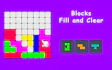

About Blocks Fill and Clear
You drag pieces onto a board, clear full lines, and watch the space open back up for more. It is the kind of quick pick up and play experience that fits into a coffee break or a long afternoon just as easily.
Read moreShow less
What makes it click is the variety. You are not stuck with one single mode, since the game offers both endless and timed challenges, each one asking for a slightly different approach to the same grid.
There is no story here, and it does not need one. The goal is always the same, clear lines and keep the board from filling up, but the way you get there changes depending on the mode you pick. This is a solid puzzle at its core, built around spatial thinking rather than reflexes or memorization. The visuals stay clean and simple, with bright blocks against a plain grid so nothing distracts from the actual decision making, and light sound effects mark each successful clear without becoming annoying over time.
If you like puzzles that reward patience and a bit of forward planning, this cool little block game is worth a few rounds. Give it a try and see how long you can keep the board clear.
Quick summary
- Drag oddly shaped pieces onto a grid and try to make them fit without wasting space.
- Complete full rows or columns to clear them and score points.
- Switch between endless and timed modes depending on how much pressure you want.
- Watch the upcoming block shapes so you can plan two or three moves ahead.
- Keep the board as open as possible since a cluttered grid runs out of room fast.
- Play in short bursts or settle in for a longer session, the pace is entirely up to you.
Key features
- Multiple game modes with their own pacing and pressure.
- Clean, colorful blocks that make the grid easy to read at a glance.
- A brain teasing core loop that rewards planning over guesswork.
- Works on both desktop and mobile screens.
- Simple drag controls anyone can pick up right away.
- No complicated menus or setup, just load in and start placing blocks.
Tips & tricks
- Always check the next block before you commit to a placement.
- Try to keep at least one open row or column free as a safety net.
- Fill edges and corners first since they are the hardest spots to use later.
- In timed modes, prioritize quick clears over perfect efficiency.
- In endless modes, slow down and think through two or three moves at once.






Comments