Draw a Skin for Mineblock with Physics
Played: 63 times
Description:
Grab a virtual paintbrush made of blocks and get ready to watch your creation fall apart in the best way possible. Draw a Skin for Mineblock with Physics hands you a blank pixel canvas, lets you build a custom Minecraft style skin one block at a time, and then throws real physics at it to see what happens.
You are not just picking a skin from a menu here. You are choosing colors and block types yourself, filling in a grid pixel by pixel until your dragon, robot, or walking cake actually looks like something. Once the design is locked in, it steps into a physics-driven playground where it walks, wobbles, and eventually gets torn apart.What makes it fun is the contrast between the careful, blocky pixel art building and the chaos that follows. You spend minutes crafting something neat, then you get to smash it to pieces and watch the blocks scatter everywhere.🎮️ How to play
Everything happens with simple clicks, no complicated combos or menus to memorize.
- Click to choose a color and block from the palette.
- Click on any pixel in the canvas to fill it in with that block.
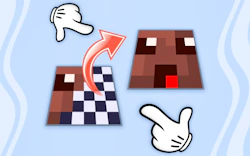
- Use the special swap function to replace blocks you already placed if you change your mind.
- Click again once your skin is finished to send it into the physics playground and start the destruction.
Mobile play
The game also runs on mobile and tablet browsers, so all of the same actions work with a simple tap instead of a click, no extra setup needed.
⚡ Quick summary
- Draw a custom Mineblock skin from scratch using a simple block by block editor.
- Pick from a full palette of colorful blocks to bring your design to life.
- Watch your finished skin walk and react inside a real physics simulation.
- Blow your creation apart and see every block tumble and scatter realistically.
- Enjoy a hypercasual loop that mixes calm creativity with sudden chaos.
- Swap and replace blocks mid-design without starting your whole skin over.
⭐ Key features
- Easy click and fill block editor for skin building.
- Physics-based movement once your skin comes to life.
- Satisfying explosive destruction mechanics.
- Simple block swap tool for quick corrections.
- Bright, blocky visuals inspired by classic sandbox games.
- Works on both desktop and mobile browsers.
The real challenge is balancing looks with structure, since a skin that is fun to look at is not always the one that holds together best once physics takes over. There is no scoring system pushing you along, so progression here is really about your own patience and creativity as you refine your coloring skills and experiment with sturdier block layouts.
Visually the game keeps things simple and chunky, leaning into a blocky sandbox look that will feel instantly familiar. The sound design adds small crunches and pops when blocks connect or shatter, which keeps the destruction part feeling snappy rather than flat.🧠 Tips & tricks
- Start with a simple outline before adding fine details to your skin.
- Use contrasting colors so your design reads clearly at a glance.
- Test different block arrangements if you want your skin to hold together longer.
- Do not be afraid to trigger the physics early just to see how your build reacts.
- Keep a mental note of designs you like so you can rebuild your favorites later.
If you like the idea of building something by hand and then finding out exactly how well it holds up, this one is worth a shot. Open it up, pick your first block, and start drawing your very own cool creation before you blow it to pieces.
🎥 Video gameplay
Video is currently not available.
📋 Game details
- Game title
- Draw a Skin for Mineblock with Physics
- Published
- at Tambi Games
- Technology
- HTML5
- Platforms
- Desktop Browser, Mobile
- Tambi Games editor ratings
- ⭐⭐⭐ (3.0/5)
❓ Frequently asked questions (FAQ)
Q: Do I need any drawing skills to make a good skin:
A: No, the block grid keeps everything simple, so even basic shapes end up looking like proper Mineblock characters:
Q: What actually happens when my skin enters the physics world:
A: It reacts to gravity and movement like a real object, so it can walk, topple over, or break apart depending on how it was built:
Q: Can I fix mistakes without redrawing the whole skin:
A: Yes, the block swap function lets you replace individual blocks so you can adjust your design without starting over:
Q: Is there a way to make my skin sturdier before the destruction starts:
A: Yes, arranging your blocks more solidly tends to help your skin hold together longer once physics kicks in:







No comments yet. Be the first to comment!