Set Bot
Played: 53 times
Description:
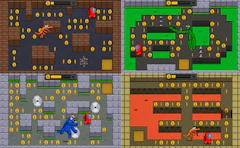
One small robot, a handful of red tech balls, and a world that seems built to knock you off every ledge. In Set Bot, you guide a nimble machine through a series of compact sci-fi stages where every jump counts.
Each level asks you to grab the glowing red balls, slip past patrolling enemy bots, and reach the exit in one piece. It starts gentle, but the routes soon twist into tight corridors and tricky drops that turn this 2D adventure into a real test of nerves.
What keeps it interesting is the double jump. You will use it to cross wide gaps, correct a bad leap in midair, and hop over enemies at the last second.
🎮️ How to play
Your robot moves and jumps with the keyboard, and the whole game comes down to how well you time each move.
- Use WASD or the arrow keys to move left and right.
- Press W or the Up arrow to jump.
- Press W or Up a second time while in the air to perform a double jump.
- Reach the exit of each level to move on to the next stage.
The game also runs in mobile browsers. Turn your phone or tablet sideways, since Set Bot is played in landscape mode.
⚡ Quick summary
- Guide a small robot through a string of short, handcrafted sci-fi levels.
- Collect every red tech ball you can find along the way.
- Dodge enemy bots that patrol platforms and block the easy routes.
- Use the double jump to cross gaps that look impossible at first.
- Avoid deadly obstacles that end your run with a single touch.
- Find the exit to unlock a new stage with harder paths.
⭐ Key features
- A cute robot hero with quick, responsive movement.
- A double jump that sits at the heart of every level.
- Red tech balls placed to tempt you into risky spots.
- Enemy bots that force you to watch patterns before you move.
- Difficulty that climbs steadily from stage to stage.
- Short levels that are perfect for quick sessions.
Progress in Set Bot is simple and clear. Every cleared stage opens the next one, and each new layout adds longer routes, tighter platforms, and tougher enemy placement. The clean 2D sci-fi look keeps hazards easy to read, so when you fail, you usually know exactly why. It is a straightforward platform game at heart, without flashy extras, and that focus is part of its charm.
🧠 Tips & tricks
- Save your second jump for the middle of a leap, not the start, so you can adjust your landing.
- Watch how each enemy bot moves for a moment before you try to pass it.
- If a red tech ball sits near a hazard, plan your exit route before you grab it.
- Tap the movement keys lightly on narrow ledges to avoid sliding off the edge.
- When a section keeps beating you, try a slower pace. Rushing is the most common way to fall.
The first level takes only a minute to learn, but the later stages will keep your fingers busy. Power up your little robot, line up that first jump, and see how far your timing can carry you.
🎥 Video gameplay
Video is currently not available.
📋 Game details
- Game title
- Set Bot
- Published
- at Tambi Games
- Technology
- HTML5
- Platforms
- Desktop Browser, Mobile
- Tambi Games editor ratings
- ⭐⭐⭐ (3.0/5)
❓ Frequently asked questions (FAQ)
Q: How does the double jump work in Set Bot:
A: Press W or the Up arrow once to jump, then press it again while you are still in the air. The second jump gives you extra height and lets you change your landing spot:
Q: What are the red tech balls for:
A: The red tech balls are the items you collect as you move through each level. They are often placed near enemies or hazards, so grabbing them takes careful planning:
Q: What happens if I touch an enemy bot or an obstacle:
A: Contact with an enemy bot or a deadly obstacle ends your attempt, and you have to try that section again. Studying enemy movement first saves a lot of retries:
Q: Do the levels get harder as I progress:
A: Yes. Each new stage brings more complex routes, trickier jumps, and tougher enemy placement, so the challenge rises steadily as you go:
Q: Should I play with WASD or the arrow keys:
A: Both work the same way, so pick whichever feels more comfortable. Many players prefer WASD because the jump key sits right above the movement keys:












No comments yet. Be the first to comment!