
Pixeler
Played: 41 times.
Description:
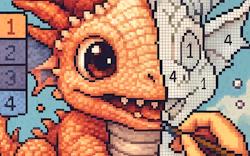
Bringing retro visual ideas to life dot by dot delivers an exceptionally engaging experience. Crafting miniature masterpieces lets casual artists enjoy authentic drawing mechanics right in the browser.
Choosing from a vibrant palette of colors makes every custom project unique. Placing each tiny block exercises your observational skills beautifully during a relaxing pixel session.
🎮️ How to play
Desktop: Use a mouse to place blocks and select colors
Mobile: Use a touchscreen to place blocks and select colors
Utilizing handy eyedropper tools guarantees perfect shade matching across complex canvases. Mastering creative coloring instruments proves your artistic cleverness constantly at your own pace.
⭐ Key features
- Eyedropper instruments letting you match custom hues instantly.
- Paint bucket options allowing quick fills on large background areas.
- Cross device compatibility supporting both desktop and mobile screens.
- Simple export options for showing off completed canvas designs.
- User friendly interface accommodating complete beginners perfectly.
Advanced designs demand ultimate zoom accuracy and careful planning from creators. Organizing complex compositions onto separate digital sheets prevents sudden overlapping mistakes.
Clean uncluttered visual styles ensure that artistic sessions remain endlessly entertaining. Experimenting with alternate techniques rewards you with genuine moments of visual triumph.
⚡ Quick summary
- Craft retro style visual compositions with minimal effort.
- Unwind with calming aesthetic mechanics and subtle creative audio.
- Choose from vibrant color pigments suitable for all expressive tastes.
- Learn the toolset in seconds and enjoy endless creative satisfaction.
- Save active projects seamlessly in browser storage to resume later.
🧠 Tips & tricks
- Start with a rough block sketch to plan your overall structural layout.
- Make good use of the zoom tool to keep tiny details perfectly accurate.
- Take regular short breaks to maintain focus and avoid eye strain.
- Save your active progress frequently to prevent any sudden data loss.
- Experiment with alternative palettes once you establish basic shapes.
🎥 Video gameplay
Video is currently not available.
📋 Game details
- Game title
- Pixeler
- Published
- at Tambi Games
- Technology
- HTML5
- Platforms
- Browser (Desktop, Laptop, Mobile)
- Tambi Games editor ratings
- ⭐⭐⭐⭐ (4.4/5)
❓ Frequently asked questions (FAQ)
Q: Can I run this creative production on my mobile phone:
A: Yes, it is fully optimized for mobile touchscreens and runs beautifully right inside your browser.
Q: How do I place colored blocks using a desktop setup:
A: Simply use a mouse to click the matching colors and tap individual grid squares.
Q: What should I do if I cannot align a very small detail perfectly:
A: Try zooming in closely on the specific canvas area before applying your brush strokes.
Q: Are there pre-made templates available to practice on:
A: The canvas accommodates both blank slate sketching and highly detailed elaborate designs.
Q: Can I save my active progress and return later:
A: Absolutely, your canvas state is retained right in your browser storage.












No comments yet. Be the first to comment!