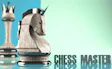

About Chess Master 3D
It sticks to standard chess with the usual six kinds of pieces.
Your goal is to trap the enemy King so it has no way out, while keeping your own King safe. The two sides take turns moving one piece each, and when you land on a square held by an enemy piece, that piece is removed from the board. This is strategy in its plainest form, where every move should have a reason behind it, whether you play it safe or take a risk.
Read moreShow less
If the 3D angle makes the position hard to read, you can switch to a flat 2D top-down board. That view looks like the chess programs that used to come preinstalled on old computers.
Pawns step one square forward, or two on their first move, and they take pieces diagonally in front of them. Rooks slide along rows and columns, Bishops slide along diagonals, and the Queen can do both.
Knights move in an L shape, two squares in a straight line and then one to the side. The King moves in any direction like the Queen, but only one square at a time.
This is a board game for one person. You always face the AI, so there is nobody to wait for between turns.
Quick summary
- You pick a side and play a full game of chess against the computer.
- Each turn you move one piece, and landing on an enemy piece removes it.
- You can switch between the 3D board and a 2D top-down board.
- The game ends when one King is trapped with no way out.
Key features
- Standard chess rules on a 3D board.
- Green squares show every legal move for the piece you select.
- An optional 2D top-down view in the style of old computer chess.
- Every game is played against an AI opponent.
- The whole game runs on the mouse alone.
Tips & tricks
- Before you commit to a move, click the piece and check the green squares so you never miss a capture.
- Use the two square first step of a pawn early to open lines for your Bishops and Queen.
- Each time you move, check whether the AI can now reach your King, and treat each turn like a small puzzle about what the computer will answer.
- Switch to the 2D view when pieces in the 3D view start to hide each other.



Comments