
About Kaido 2
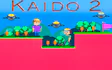
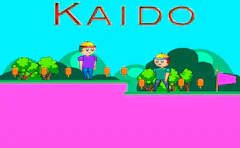
Kaido 2 keeps things simple: a quick little hero, a trail of orange ice cream bars, and a pink flag waiting at the end of every level.
This is a bright 2D adventure where every jump counts. Enemies patrol the ground, flying robots drift through the air, and tricky obstacles are placed to punish a rushed leap.
Read moreShow less
The early stages ease you in gently. After that, the layouts get tighter and the gaps get wider, so your double jump quickly becomes the most important move you have.
Progress in Kaido 2 is all about the next flag. Each level asks a little more of your timing than the one before, so the challenge comes from smarter enemy placement rather than cheap surprises.
The visuals are soft and cartoony, with clean platforms that make it easy to read where you can land. It's a small game built on Construct 2, so don't expect huge variety, but the core jumping feels solid and the short levels make "one more try" very tempting.
Kaido is waiting at the start line and the ice cream won't collect itself. Start the first level, get a feel for that double jump, and see how many flags you can reach before the robots get the better of you.
Quick summary
- Run and jump across cheerful 2D levels packed with ice cream bars.
- Avoid ground enemies and flying robots that guard the path ahead.
- Time your double jump to clear wide gaps and tall ledges.
- Reach the pink flag to finish each stage and unlock the next one.
- Face harder layouts as the levels slowly build up the pressure.
- Learn each stage through short, easy to restart attempts.
Key features
- Simple controls that anyone can pick up in seconds.
- A double jump that feels central to every level.
- Two kinds of threats, walkers on the ground and robots in the sky.
- Colorful, friendly 2D art with a playful feel.
- A steady difficulty curve from level to level.
Tips & tricks
- Save your second jump until you're near the top of the first one, it gives you more height.
- Watch the flying robots for a moment before you jump, their paths are easier to dodge once you see the rhythm.
- Don't chase every ice cream bar if it means a risky leap near an enemy.
- Walk slowly into new areas so you can spot hazards before you're on top of them.
- If a section keeps beating you, try a different jump timing instead of just jumping faster.






Comments