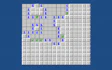

About Mine Finder
It is a puzzle game.
Left-click tiles to explore. Right-click to mark potential mines, and right-click again to unmark them. To win, uncover all safe tiles in this mining game.
Read moreShow less
Deduce which spots are safe, because one wrong move could end your game. Start at the grid's edges, where useful hints often hide, a game of strategy.
Quick summary
- A grid hides mines among safe tiles.
- Left-click to explore a tile.
- Right-click to mark suspected mines.
- Uncover all safe tiles to win.
Key features
- Grid-based puzzles with numerical hints.
- Each number shows adjacent mine count.
- Mark mines with a right-click.
- One wrong move ends the game.
Tips & tricks
- Start your exploration at the grid's edges.
- Use numbers to deduce safe spots before clicking.
Frequently asked questions
How do you mark a mine?
Right-click to mark potential mines. Right-click again to unmark.
What do the numbers mean?
Each number shows how many mines are adjacent to that tile.
How do you win?
Uncover all safe tiles.
What happens if you click a mine?
One wrong move could end your game abruptly.










Comments