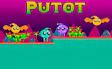
About Putot
Hostile aliens patrol the floors, flying creatures swoop through the air, and the gaps between ledges get wider the further you go.
This is a compact platform game built around one clever skill, the double jump. Many cubes sit in spots you can't reach with a normal hop, so you'll learn to chain two jumps and time them just right.
Read moreShow less
There are eight levels in total, each with its own layout and set of traps. You won't find endless filler here, just a short, focused run where every stage asks a little more of your timing.
Progress in Putot is all about clearing stages cleanly. Each level is a little puzzle of routes, where you figure out the order to grab the cubes and the safest moment to cross an enemy's path. The action comes in short bursts of jumping and dodging, followed by a quick pause to plan your next move.
The look is clean, simple 2D art with readable enemies and platforms, so you always know what can hurt you. It's a modest game rather than a flashy one, but the layouts do a good job of keeping each stage feeling different.
Eight levels, a pile of cubes, and a lot of creatures standing between you and the exit. Warm up your jumping thumb and start your adventure with Putot right now.
Quick summary
- Guide Putot through eight hand-built 2D levels full of traps.
- Collect every hidden cube in a stage to unlock the way forward.
- Dodge ground-walking aliens and a whole crowd of flying monster enemies.
- Use the double jump to reach treasure tucked away on high platforms.
- Study enemy patterns before you move, since one bad jump sends you back.
- Face harder layouts and tighter gaps as you push toward the final level.
Key features
- Eight distinct levels with no padding.
- A double jump that changes how you read every ledge.
- Cube collecting that rewards exploring every corner.
- Enemies on the ground and in the air.
- Simple keyboard controls with WASD or arrow keys.
- A steady difficulty climb from start to finish.
Tips & tricks
- Don't rush. Watch an enemy loop once before you try to pass it.
- Save your second jump for the top of your first one to get maximum height.
- Check high corners and hidden ledges, since that's where stray cubes like to hide.
- Flying enemies often move in fixed patterns, so wait for a gap instead of jumping blind.
- If a level feels stuck, count the cubes you have left and look for a spot you skipped.







Comments