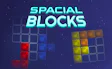
About Spacial Blocks
It is a calm puzzle game played with just the mouse, and there is no timer.
Each level puts a grid in the middle of the screen with some of its squares highlighted. Below it, a few bubbles each hold one block, and together those blocks are exactly what the highlighted space needs. Fill all of it and the next level opens.
Read moreShow less
The blocks cannot be rotated. Each one has to go into the grid facing the way it already does, so the real question is where a shape belongs, not how to turn it. You can pick up a block you already placed and move it as often as you like.
There is no way to lose a level. It only ends when the space is full, so the only pressure comes from the shape of the grid itself. If you get stuck, an occasional hint is available, and you can watch an ad to get one.
The backstory is light. The blocks have drifted in from some other dimension and need a place to settle, and you are the one with the empty space. The shapes are the ones you know from Tetris, but nothing falls and the area to fill is already outlined for you.
Quick summary
- Each level starts with a grid in the middle and a few blocks waiting in bubbles below it.
- You drag the blocks onto the highlighted squares, keeping each one facing the way it came.
- You can move blocks again, so you rearrange them until the last gap closes.
- When the highlighted space is full, the next level opens.
Key features
- A relaxed block game with no timer and no way to lose.
- The pieces use the same shapes as Tetris blocks.
- You play the whole game with the mouse alone.
- Hints are there when a level has you stuck.
- It runs on phones and tablets in portrait mode.
Tips & tricks
- Place the largest or oddest block first and look for the one spot where it fits without leaving a gap.
- Because blocks never rotate, compare each block's outline with the empty corners and edges of the grid exactly as they are.





Comments